
Education technology is evolving faster than ever, and platforms that once focused on simple quizzes are now transforming into full-scale learning ecosystems. One of the most talked-about names in this space today is Wayground.
Formerly known for its quiz-based learning tools, Wayground has expanded into a broader educational experience platform designed for teachers, students, and organizations that want to make learning more interactive, data-driven, and personalized.
But what exactly is Wayground? Why did it rebrand? And is it actually useful for modern classrooms and self-learners?
This guide breaks everything down in a clear, practical, and experience-driven way so you can understand whether Wayground is right for your needs.
What Is Wayground?
Wayground is an interactive learning platform designed to help educators create, share, and manage engaging learning experiences. It evolved from a popular quiz-based learning tool into a more comprehensive digital education environment.
At its core, Wayground focuses on:
- Interactive learning content (quizzes, lessons, assessments)
- Real-time student engagement
- AI-assisted content creation
- Data-driven performance tracking
- Flexible learning formats for classrooms and remote learning
Instead of being just a quiz tool, Wayground now positions itself as a learning experience platform that supports both teaching and independent learning.
Why Did Quizizz Become Wayground?
The rebranding from Quizizz to Wayground reflects a shift in vision.
Quizizz originally became popular for its gamified quizzes used in classrooms. However, as education technology evolved, the platform expanded far beyond quizzes.
Key reasons for the rebrand:
1. Expansion beyond quizzes
The platform now supports lessons, assignments, AI tools, and full learning journeys.
2. Broader education ecosystem
Wayground is designed not only for teachers but also for schools, districts, and corporate training environments.
3. AI-powered learning tools
Modern classrooms require adaptive learning, and Wayground integrates AI features to support content creation and personalization.
4. Global positioning
The new brand reflects a wider, more universal education identity beyond a single product category.
In short, Wayground represents the evolution from a “quiz app” into a full learning platform.
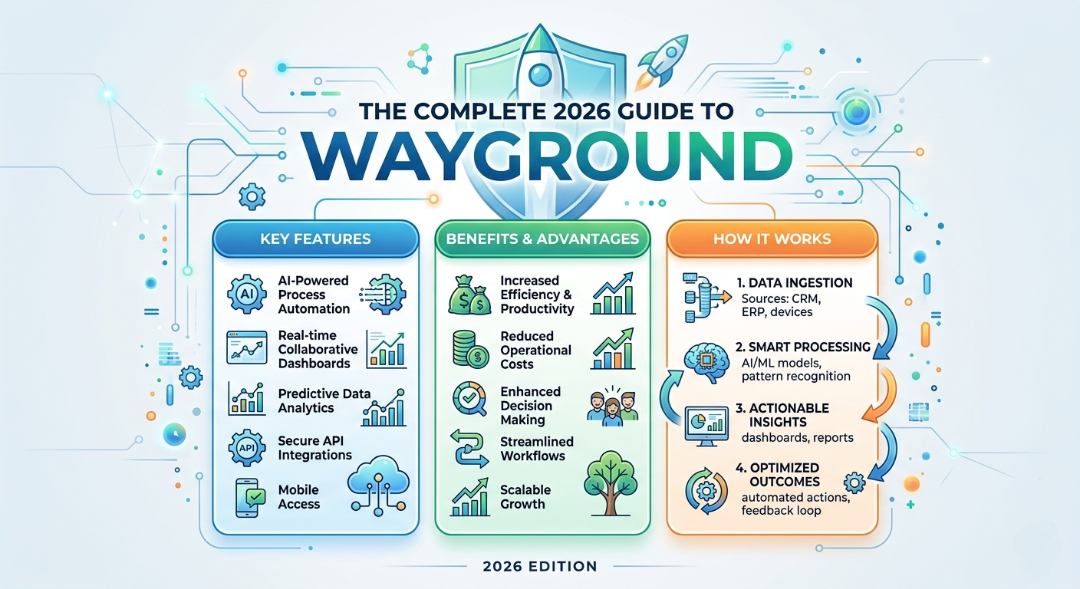
Key Features of Wayground
Wayground stands out because it combines simplicity with powerful educational tools. Let’s break down its major features.
1. Interactive Quizzes and Assessments
Wayground allows educators to create engaging quizzes that students can complete in real time or at their own pace.
Key highlights:
- Multiple question formats (MCQs, polls, open-ended)
- Instant feedback for learners
- Live or homework mode
- Gamified scoring system
This feature is still the foundation of the platform and remains one of its strongest assets.
2. AI-Powered Lesson Creation
One of the most powerful updates in Wayground is its AI-assisted content generation.
Teachers can:
- Generate quizzes from text
- Convert notes into interactive lessons
- Create questions automatically
- Save time on lesson planning
This reduces preparation time significantly and improves content consistency.
3. Real-Time Classroom Engagement
Wayground is designed to keep students actively involved during lessons.
Teachers can:
- Run live quizzes in class
- Monitor student responses in real time
- Identify struggling learners instantly
This makes it especially useful in hybrid or remote classrooms.
4. Detailed Analytics and Reports
Data plays a major role in modern education, and Wayground provides detailed performance insights.
Educators can track:
- Accuracy rates
- Response times
- Question-level performance
- Class progress over time
These insights help teachers adjust instruction strategies effectively.
5. Pre-Made Content Library
Wayground includes a large library of ready-to-use quizzes and lessons created by educators worldwide.
Benefits include:
- Time-saving resources
- Curriculum-aligned content
- Community-driven learning materials
Teachers can either use these directly or modify them.
6. Flexible Learning Modes
Students don’t all learn the same way, and Wayground supports multiple modes:
- Live classroom mode
- Homework assignments
- Self-paced learning
- Practice mode for revision
This flexibility makes it suitable for both structured classrooms and independent study.
How Wayground Works (Step-by-Step)
Understanding how Wayground works is key to using it effectively.
Step 1: Create an account
Teachers or learners sign up and choose their role.
Step 2: Build or select content
You can:
- Create a quiz from scratch
- Use AI to generate questions
- Choose from the existing library
Step 3: Assign or launch
Content can be:
- Assigned as homework
- Played live in class
- Shared via link
Step 4: Students participate
Students join using a code or link and complete the activity.
Step 5: Analyze results
Teachers review performance dashboards and identify learning gaps.
Who Should Use Wayground?
Wayground is designed for a wide range of users.
1. Teachers
- Classroom engagement
- Test preparation
- Homework assignments
2. Schools and Institutions
- Standardized assessments
- Curriculum tracking
- Performance reporting
3. Students
- Self-practice
- Exam revision
- Concept reinforcement
4. Corporate Trainers
- Employee training modules
- Knowledge checks
- Interactive workshops
Benefits of Using Wayground
Wayground offers several advantages that make it stand out in the education technology space.
1. Improved student engagement
Gamified learning keeps students motivated.
2. Time-saving for educators
AI tools reduce lesson preparation workload.
3. Better learning outcomes
Instant feedback improves knowledge retention.
4. Easy accessibility
Works across devices including laptops, tablets, and smartphones.
5. Scalable for institutions
Suitable for small classrooms or large school systems.
Wayground Pricing Overview
Wayground typically offers multiple pricing tiers depending on usage needs.
While exact pricing may vary by region and institution, common models include:
- Free tier with basic features
- Teacher premium plans with advanced tools
- School/district licensing for large-scale deployment
The free version is often sufficient for individual teachers, while institutions benefit more from paid analytics and management features.
Wayground vs Traditional Learning Methods
| Feature | Traditional Classroom | Wayground |
| Engagement | Passive | Interactive |
| Feedback | Delayed | Instant |
| Content creation | Manual | AI-assisted |
| Analytics | Limited | Advanced |
| Flexibility | Low | High |
Wayground clearly enhances modern teaching by making learning more dynamic and measurable.
Limitations of Wayground
No platform is perfect. Here are a few limitations to consider:
- Requires internet access for full functionality
- Overuse of gamification may distract some learners
- Advanced analytics may require training to interpret
- Some features are locked behind paid plans
Despite these, the benefits generally outweigh the drawbacks for most users.
Best Practices for Using Wayground Effectively
To get the most out of the platform:
1. Mix quiz types
Use a combination of MCQs, polls, and open-ended questions.
2. Use AI tools wisely
Review AI-generated content before publishing.
3. Analyze reports regularly
Don’t just run quizzes—use insights to adjust teaching.
4. Keep sessions short
Engagement drops in overly long sessions.
5. Encourage participation
Use leaderboards and rewards to motivate learners.
Common Use Cases of Wayground
- Weekly classroom quizzes
- Revision before exams
- Homework assignments
- Corporate training assessments
- Interactive workshops
- Remote learning sessions
Conclusion
Wayground represents the next step in digital learning evolution. What started as a simple quiz platform has grown into a full-scale educational ecosystem powered by interactivity, AI, and real-time analytics.
For teachers, it reduces workload and improves engagement. For students, it makes learning more interactive and enjoyable. For institutions, it provides scalable tools for modern education delivery.
While it may not replace traditional teaching entirely, it significantly enhances it by making learning more measurable, flexible, and engaging.
If you’re looking for a modern way to transform classroom or self-learning experiences, Wayground is one of the most practical tools available today.
FAQ About Wayground
1. What is Wayground used for?
Wayground is used to create interactive learning experiences such as quizzes, lessons, and assessments for students and professionals.
2. Is Wayground free?
Yes, Wayground offers a free version with basic features. Premium plans provide advanced analytics and tools.
3. Is Wayground good for students?
Yes, it helps students learn through interactive quizzes, instant feedback, and gamified learning.
4. Can teachers use Wayground for homework?
Absolutely. Teachers can assign quizzes as homework and track student performance easily.
5. Does Wayground use AI?
Yes, it includes AI tools that help generate questions, lessons, and learning content automatically.
6. What devices support Wayground?
Wayground works on laptops, tablets, and smartphones through a web browser or app.